How to find students without Timetables for Semester 2

Modified on Fri, 10 Apr at 7:46 AM

The dashboard card applies only to students who have not had a timetable at any time during this school year. To verify that all students have a schedule for the current semester, please use the Advanced Search function.

Specific number of classes (this year) – Number of classes = Less than – 1

                                                                                         Class Semester = 2

                                                                                        Search
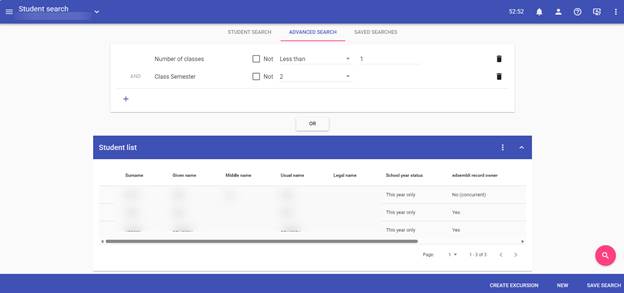
The image shows a student search interface with fields for surname, given name, middle name, usual name, and school year status, along with options to filter by semester and status.

AI-generated content may be incorrect.

Was this article helpful?

That’s Great!

Thank you for your feedback

Sorry! We couldn't be helpful

Thank you for your feedback

Let us know how can we improve this article!

Select at least one of the reasons
CAPTCHA verification is required.

Feedback sent

We appreciate your effort and will try to fix the article